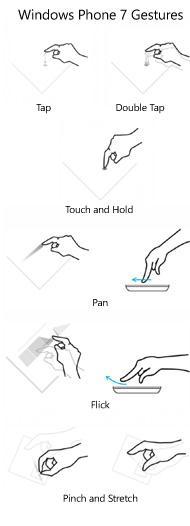
Una vez que tenemos instalado el Toolkit solo tenemos que añadir la referencia al assembly Microsoft.Phone.Controls.Toolkit y referenciarlo en el XAML
xmlns:toolkit="clr-namespace:Microsoft.Phone.Controls;assembly=Microsoft.Phone.Controls.Toolkit"
El siguiente paso es añadir una instancia del objeto GestureListener al elemento donde queremos capturar los gestos del usuario por ejemplo a un grid
<Grid x:Name="LayoutRoot" Background="Transparent">

	<toolkit:GestureService.GestureListener>

	<toolkit:GestureListener x:Name="gl" />

	</toolkit:GestureService.GestureListener>

	;....

</Grid>
Para los gestos simples manejaremos un evento en el GestureListener
- Tap – EventArgs: (point)Origin, (object)OriginalSource
- DoubleTap – EventArgs: (point)Origin, (object)OriginalSource
- Flick – EventArgs: (double)Angle, (Orientation)Direction, (double)HorizontalVelocity, (double)VerticalVelocity
Para el gesto Pan
- DragStarted – EventArgs: (Orientation)Direction
- DragCompleted – EventArgs: (Orientation)Direction, (double) HorizontalVelocity, (double) VerticalVelocity, (double) HorizontalChange, (double) VerticalChange
Para el gesto Pinch Stretch :
- Tap – captura la coordenada original
- PinchStarted – EventArgs: (double) Angle, (double) Distance – entre los dos puntos
- PinchDelta – EventArgs: (double) DistanceRatio, (double) TotalAngleDelta
- PinchCompleted – EventArgs: (double) DistanceRatio, (double) TotalAngleDelta
Para Touch & Hold :
- Tap –
- Hold – EventArgs: (point)Origin
Por ejemplo para hacer el gesto pinch en una imagen
<Image x:Name="MyImage" Source="Phone.png">
	<Image.RenderTransform>
		<CompositeTransform x:Name="ImageTransformation" />
	</Image.RenderTransform>
	<toolkit:GestureService.GestureListener>
	<toolkit:GestureListener PinchStarted="OnPinchStarted" PinchDelta="OnPinchDelta" />
	</toolkit:GestureService.GestureListener>
 </Image>
En los eventos deberíamos hacer
private void OnPinchStarted(object sender, PinchStartedGestureEventArgs e){
	// store the initial rotation angle and scaling
	_initialAngle = ImageTransformation.Rotation;
	_initialScale = ImageTransformation.ScaleX;
	// calculate the center for the zooming 8 Point firstTouch = e.GetPosition(MyImage, 0);
	Point secondTouch = e.GetPosition(MyImage, 1);
	Point center = new Point(firstTouch.X + (secondTouch.X - firstTouch.X) / 2.0,
	firstTouch.Y + (secondTouch.Y - firstTouch.Y) / 2.0);
	ImageTransformation.CenterX = center.X;
	ImageTransformation.CenterY = center.Y;
}

private void OnPinchStarted(object sender, PinchStartedGestureEventArgs e) {
	// store the initial rotation angle and scaling
	_initialAngle = ImageTransformation.Rotation;
	_initialScale = ImageTransformation.ScaleX;
	// calculate the center for the zooming 8 Point firstTouch = e.GetPosition(MyImage, 0);
	Point secondTouch = e.GetPosition(MyImage, 1);
	Point center = new Point(firstTouch.X + (secondTouch.X - firstTouch.X) / 2.0,
	firstTouch.Y + (secondTouch.Y - firstTouch.Y) / 2.0);
	ImageTransformation.CenterX = center.X;
	ImageTransformation.CenterY = center.Y;
}
Ahora cuando el usuario tiene los dos dedos en la pantalla y los gira recibiremos el evento PinchDelta y realizaremos las transformaciones en la imagen
private void OnPinchDelta(object sender, PinchGestureEventArgs e){
	// update the rotation and scaling 4 ImageTransformation.Rotation = _initialAngle + e.TotalAngleDelta;
	ImageTransformation.ScaleX = _initialScale * e.DistanceRatio;
	ImageTransformation.ScaleY = ImageTransformation.ScaleX;
}
Como veis es mas sencillo de utilizar que meternos a bajo nivel como en los anteriores artículos
Autor del artículo: Oskar Álvarez